Cogtify Logo
Cogtify Logo

Make LinkedIn YourEngagement Engine

Smart tools for building community connections, delivering tone-consistent content, and driving measurable LinkedIn performance.

Get Started

Arrow Icon

Schedule A Demo

Experience Cogtify

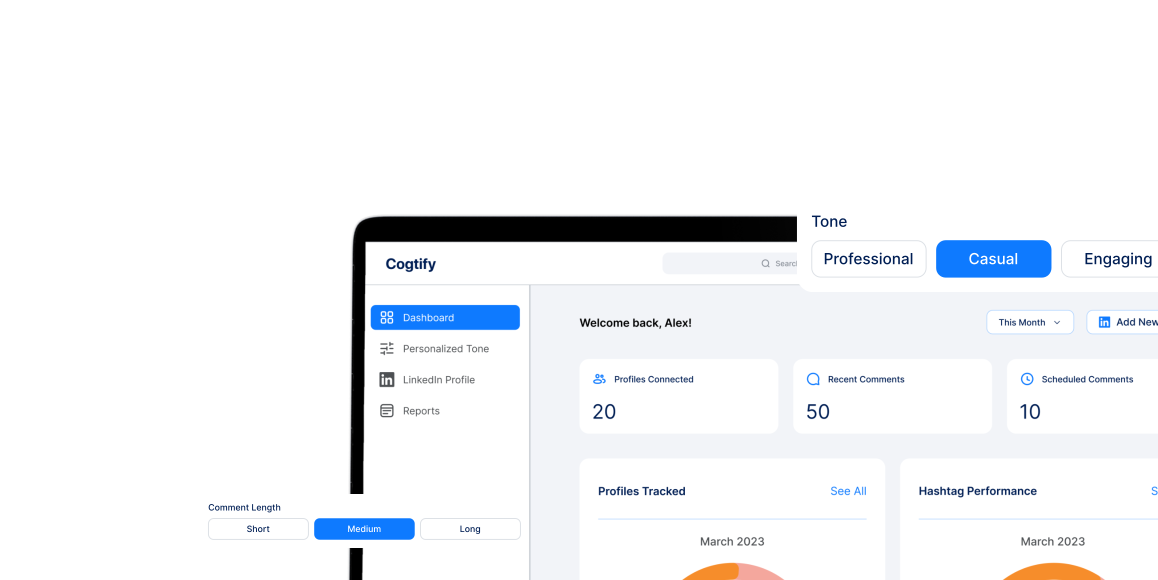
Watch how Cogtify revolutionizes LinkedIn engagement with smart engagement, AI-powered insights, and real-time analytics—all seamlessly integrated.

Smart Engagement

AI-driven interactions that work 24/7

Live Analytics

Real-time insights and performance tracking

Instant Setup

Launch in minutes, not hours

Enterprise Security

Bank-level encryption and privacy

Why Choose Cogtify?

No More Writer's Block
Let Cogtify Auto-Craft Thoughtful Comments That Resonate.
Smart Personalization
Use tones that match you, not robotic replies.
Data-Driven Decisions
Track reactions, profile engagement, and industry trends.
Boost Profile Visibility
Auto-tag authors, use hot hashtags, and engage in relevant niches.

How It Works

STEP 01
Install Cogtify Extension
Add the Chrome extension and connect your workspace in one click.
STEP 02
Customize Your Style
Set tone, preferred hashtags, and length presets. Save multiple profiles for different campaigns.
STEP 03
Automated Commenting
Cogtify Identifies Relevant Posts, Waits 24 Hours, And Comments For You.
STEP 04
Track & Optimize
View Engagement Data, Approve/Edit Comments, And Export Performance Reports.
App menu

Everything you need to use Cogtify

Access powerful tools after signing up, installing the Chrome extension, and connecting your LinkedIn account.

1
Sign up & verify
Create your account and verify your email to get started with Cogtify.
2
Install Chrome extension
Add the Cogtify extension to your browser in one click. Works seamlessly with LinkedIn.
3
Connect LinkedIn
Connect your LinkedIn account and grant necessary permissions to start automating engagement.

Requires LinkedIn login

Simple, transparent pricing
Start free. Upgrade anytime.

Growth

$0/ month

Essential for consistent LinkedIn engagement

2 Comments per Day
3 Commenting Tones
1 LinkedIn Account
Human Approval Mode
AI-Generated Comment Prompts

Creator

$0/ month

Build authority through content and engagement

Everything in Pro
AI-Generated LinkedIn Post Writing
Post Scheduling & Calendar
Post Performance Insights (Basic)
Priority Support
Early Access to New Features

Feedback That Fuels Our Momentum

"Cogtify reduced my morning routine from nearly an hour to just 10 minutes. I simply review the queue over coffee, approve what I like, and it posts naturally throughout the day."

Sarah Jenkins

Freelance Graphic Designer

"The Chrome extension is unbelievably easy. No complex dashboard—just one click to connect, and automation started instantly."

David Chen

SaaS Founder

"I wanted more visibility but couldn't comment on 20+ posts daily. Cogtify handles it and still delivers a huge engagement boost."

Elena Rodriguez

Real Estate Consultant

"I was afraid the comments would sound robotic, but the tone settings make everything feel like my real voice."

Mark T.

Digital Strategist

"Other tools generate generic comments, but Cogtify actually reads posts and writes context-aware responses. My network thinks I'm consistently active."

Priya Patel

Business Coach

"The AI now understands my style so well that I barely have to edit anything. It gets better every week."

James O'Connor

FinTech Executive

"Managing multiple CEOs' personal brands used to be chaos. With multi-profile support and tone presets, it's finally organized."

Liam B.

Social Media Manager

"The collaboration feature is a game changer. My team can draft, review, and approve comments together before they go live."

Sophie Dubois

Corporate Communications Lead

"The 'Write a post' feature fills my content calendar quickly. I give it a topic and it generates a strong draft every time."

Amir K.

Software Developer

"I came for the automated comments, but the built-in publishing and scheduling tools made LinkedIn far more efficient for me."

Rachel Green

HR Specialist

"The analytics dashboard shows exactly what's working—hashtags, tone, engagement trends. It takes the guesswork out."

Marcus Thorne

Sales Director

"The 7-day trial proved the value fast. Within 48 hours my notifications were buzzing and I even got qualified leads."

Jessica Hall

B2B Consultant

"Uploading my own hashtags helps me reach the right audience instead of random posts. Targeting is super accurate."

Oliver Grant

Startup Advisor

"I love that I control everything before it posts. It's fast because of AI but safe because approval is still mine."

Emily V.

Legal Consultant

"The delayed commenting makes everything look human and natural instead of spammy. Nobody suspects automation."

Daniel S.

UX Designer

Frequently Asked Questions

Cogtify is an AI-powered engagement copilot for LinkedIn. It studies your tone, preferred talking points, and target audience to draft thoughtful comments, icebreakers, and responses that sound like you. Think of it as a research assistant, copywriter, and scheduling tool wrapped into one.

No. Each comment is generated from your tone library and is reviewed (and optionally edited) by you before publishing. We never reuse templated copy across accounts, and the timing plus pacing rules mirror natural human behavior.

Yes. Cogtify connects through encrypted OAuth and follows LinkedIn’s rate limits, quiet hours, and usage guidelines. We also provide role-based access, audit trails, and manual review workflows so you always stay compliant.

Absolutely. Upload writing samples, choose tones (professional, casual, playful), set topics to emphasize or avoid, and add preferred hashtags or emojis. Cogtify learns from every edit, so your library becomes sharper over time.

Yes. Every suggestion is queued for your approval. You can accept, tweak, or reject drafts, schedule them for later, and collaborate with teammates inside the same dashboard before anything goes live.

Ready To Boost Your LinkedIn
Engagement?

Get Started

Arrow Icon
LinkedIn Analytics Dashboard on Laptop

Contact Us

Get in touch with our team. We're here to help and answer any questions you might have.

Send us a Message

Fill out the form below and we'll get back to you as soon as possible.

Phone